By Prasanth Kumar · September 9, 2026 · updated September 10, 2026
The screen is most of what a phone is — you stare at it for hours a day — yet the spec sheet reduces it to a couple of acronyms and one giant “nits” number. Both of those hide more than they tell. Here is what AMOLED, IPS LCD and the rest actually mean, the marketing tricks buried in the numbers, and how to judge a screen in a shop in under a minute.
Two families, one big difference
Every phone screen is either an LCD or an OLED, and one design choice explains almost every trade-off that follows.
- LCD (this includes “IPS LCD” and “TFT”) has a single white backlight behind the whole panel. Liquid-crystal shutters twist to let more or less light through for each pixel. The backlight never fully switches off, so “black” is really dark grey with the light leaking through.
- OLED (Samsung brands its version AMOLED) has no backlight. Every one of the millions of sub-pixels is its own tiny light. To show black, a pixel simply switches off — drawing zero power and emitting zero light.
That is why OLED gives perfect black and “infinite” contrast, why an always-on clock costs an OLED almost no battery, and why a bright star can sit next to true black in the same HDR frame. It is also why OLED can suffer burn-in and flicker, which LCD does not. Premium LCDs (mini-LED) chase OLED’s contrast with hundreds of local dimming zones, but a phone-sized panel rarely has room for that.
Your “1080p” AMOLED probably isn’t 1080p
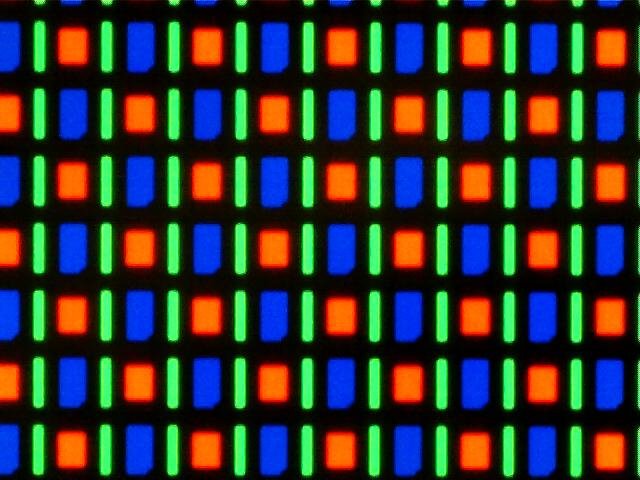
An RGB-stripe LCD gives every pixel a full red, green and blue sub-pixel. Most AMOLED panels (Samsung’s and Apple’s included) don’t — they share sub-pixels between neighbours in a PenTile arrangement, so a “2400 × 1080” AMOLED has roughly a third fewer sub-pixels than an LCD with the same on-paper resolution. The maker still prints the full number.
Does it matter? On a sharp flagship (450–500+ pixels per inch) your eye cannot resolve individual sub-pixels, so no. On a cheaper large AMOLED, fine white text on black and thin diagonal lines can look faintly fuzzy or colour-fringed. If you read a lot of small text, a crisp 1080p and a high pixel density matter more than the panel badge.
The brightness number is a magic trick
“4500 nits peak brightness” does not mean the screen ever gets that bright in your hand. Peak is measured on a tiny window — often under 10% of the screen — showing an HDR highlight, for a few seconds, before the phone throttles it down to avoid overheating.
What you actually live with is full-screen sustained brightness (sometimes called “high brightness mode” or “typical” brightness) — a white web page or a map under the sun. That figure is usually two to three times lower than the peak number. Roughly 800–1000 nits sustained is comfortable in direct sunlight; below ~500 you will be shielding the screen with your hand. When a listing quotes only the huge peak figure and not a sustained one, assume the sustained value is unremarkable.
PWM flicker: the eye-strain spec nobody prints
Below roughly half brightness, most OLED panels don’t actually dim — they switch the whole panel fully on and off, hundreds of times a second, and your brain averages it to “dimmer”. This is PWM (pulse-width modulation). A minority of people — estimates run from a few percent to one in ten — get headaches, eye strain or nausea from low-frequency PWM over a long session, especially at night.
The frequency is what matters, and almost no spec sheet lists it:
- ~120–240 Hz — budget and older OLED. The most likely to bother sensitive eyes.
- ~480 Hz — Samsung Galaxy flagships and iPhones have sat here for years. Better, still noticeable for some.
- 1920 Hz and up, or true DC dimming — many recent phones from Google (Pixel), Honor, Motorola and others. Comfortable for nearly everyone.
- LCD — normally dims by voltage (DC), so no visible flicker at any brightness. This is LCD’s most underrated advantage.
Test it yourself: in a dark room, set the phone to minimum brightness and film its screen with a second phone’s slow-motion camera. Dark bands rolling through the video mean low-frequency PWM. A clean, steady image means high-frequency PWM or DC dimming.
Burn-in, the honest version
OLED sub-pixels age with use, and the blue ones wear out fastest — blue OLED material simply has the shortest chemical lifespan. So the first sign of a tired OLED is usually not a visible “ghost” image; it is a faint yellow or pink tint creeping into what should be pure white, because the blue channel has faded. Actual ghosting — a shadow of the navigation bar, a game’s HUD, or the YouTube logo — comes later, after years of the same static element at high brightness.
Modern phones fight this: they nudge the whole image a pixel or two every minute, quietly dim static interface elements, and vary the pixels under the status bar. For a phone you keep three or four years, burn-in is rarely a real problem. For a six-year-old hand-me-down that lived at full brightness, it can be. LCD has none of this — no burn-in, ever.
How they compare
| AMOLED / OLED | IPS LCD | |
|---|---|---|
| Black & contrast | Perfect black, effectively infinite contrast | Dark-grey black, “IPS glow” at corners in the dark |
| Colour | Punchy by default; accurate in a calibrated mode | Often more neutral out of the box |
| Dark-mode battery | Real saving — black pixels are off | None — backlight stays on |
| Always-on display | Efficient, practical | Not practical |
| Sustained brightness | Usually higher on flagships | Good on better panels, and no thermal roll-off |
| Flicker (PWM) | Present below ~50%; frequency varies a lot | Usually none (DC dimming) |
| Burn-in | Small risk over many years of static content | None |
| Sub-pixels per pixel | Usually 2 (PenTile) | 3 (full RGB) |
| Cost | Higher | Lower |
Decoding the marketing names
They are almost all just OLED with a brand prefix:
- Super AMOLED — the touch layer is built into the panel instead of sitting on top. Slightly thinner, marginally better in sun. Image quality: no difference.
- Dynamic AMOLED (Samsung), Fluid AMOLED (OnePlus), Super Retina XDR (Apple) — each brand’s HDR-capable OLED. Marketing, not a different technology.
- pOLED — OLED on a plastic rather than glass substrate, which is what lets a screen curve at the edges.
- LTPO vs LTPS — the panel’s backplane. LTPO can drop the refresh rate all the way to 1 Hz for the always-on display and saves the most battery; LTPS usually floors around 30–60 Hz. LTPO is a flagship feature.
- Plain “AMOLED” on a phone under ~₹13,000 is often a lower-binned panel — 60–90 Hz, lower brightness, low-frequency PWM.
Which should you buy?
- Under ~₹12,000: you will get IPS LCD or a basic AMOLED. A good IPS LCD at this price is often brighter and completely flicker-free — a fair choice, not a compromise.
- ~₹13,000–20,000: 120 Hz AMOLED is the norm and the sweet spot. Check the sustained brightness figure and the resolution is Full HD+.
- ~₹25,000 and up: LTPO AMOLED, higher sustained brightness, and on some models much better PWM behaviour.
- Sensitive to flicker or headaches: an IPS LCD, or an OLED that reviewers confirm runs 1920 Hz+ PWM or DC dimming — not just one that says “eye comfort” on the box.
- Mostly outdoors: ignore the panel badge and the peak number; find the sustained or high-brightness-mode figure and want 1,000 nits or more.
Judge a screen in 60 seconds (in the shop)
- Open a pure black image full-screen and tilt the phone. A cheap AMOLED shifts green or pink off-axis; an IPS LCD shows a faint glow at the corners.
- Open a pure white image. Look for an even tone with no yellow or blue patches, and no visible grain in the white.
- In the shadiest spot you can find, drop brightness to minimum. Does it go dark enough to read in bed without dazzling you? Film it in slow-motion for flicker.
- Read the spec sheet: it should name the panel type and give a brightness figure. “HD display” with no panel type named almost always means a basic LCD.
FAQ
Is AMOLED bad for your eyes?
Not inherently, and for most people it is completely fine. The issue is PWM flicker at low brightness, which a minority are sensitive to. If long phone sessions leave your eyes tired or give you headaches, try an LCD phone or an OLED with high-frequency PWM / DC dimming and see if it helps.
Why does my cheap phone’s white screen look slightly grey or blue?
On a budget LCD, “white” is the backlight leaking through, so it reads as light grey rather than bright white, and cheaper backlights skew slightly blue. Next to an OLED showing the same page it looks washed out; on its own it is usually fine once your eyes adjust.
Will an AMOLED screen get burn-in?
Possibly, after years of heavy use with the same static elements — and it usually shows first as a faint colour tint in whites, not a ghost image. Pixel-shifting and auto-dimming of static UI make it a non-issue for a typical three-to-four-year ownership.
AMOLED vs Super AMOLED — is there a real difference?
Super AMOLED just builds the touch layer into the panel. The screen is a touch thinner and slightly better in sunlight; the image looks the same.
What panel does the iPhone use?
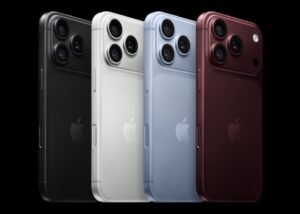
OLED, which Apple calls “Super Retina XDR”. Standard iPhones ran a 60 Hz OLED for years — deep blacks and OLED colour without the fast refresh rate — while Pro models add ProMotion up to 120 Hz and higher sustained brightness. Apple’s OLEDs use ~480 Hz PWM.
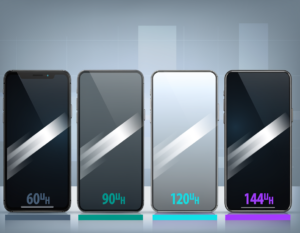
Refresh rate (90 Hz, 120 Hz) is a separate spec from panel type — see our chipset explainer and the phone buying guides for how the pieces fit together.
More explainers in Tech Explained. Ready to buy? See our phone buying guides.

Prasanth Kumar is the founder and editor of technew.cloud. He is a technology professional with over 10 years of experience in DevOps, SRE, cloud computing, Kubernetes, Terraform, CI/CD and infrastructure. He writes about smartphones, laptops, graphics cards, gadgets, AI tools, and the technology and products he researches, uses and evaluates. Based in India.